
- Post by: Admin
- September 16, 2026
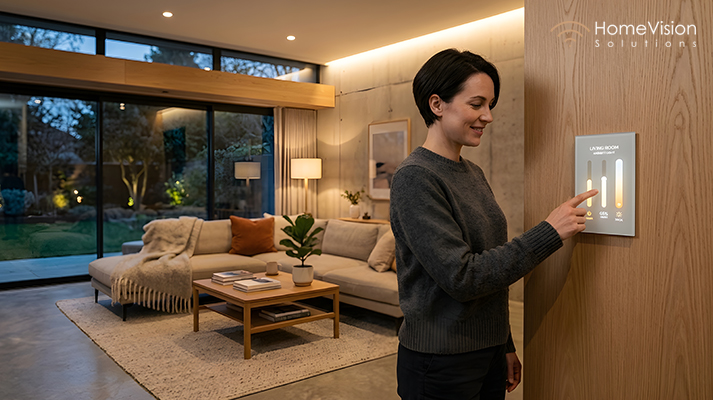
Five apps for five different systems isn’t a smart home, it’s just five separate gadgets that happen to live in the same house. If you’ve ever stood in your kitchen juggling a lighting app, a thermostat app, a camera app, and a shades app just to get ready for dinner guests, you already know the problem. Figuring out how to control your smart home from one app is really about turning a pile of individual devices into a single, coordinated system.
Table of Contents
- Why Multiple Apps Defeats the Purpose of a Smart Home
- What "One Unified App" Actually Means
- How to Control Your Entire Smart Home from One App
- Build Automated Scenes That Combine Everything
- Everyday Benefits of Controlling Your Smart Home from One App
- What to Consider Before Consolidating Into One App
- Planning Your Move to a Unified Smart Home App
- Common Mistakes When Consolidating Smart Home Control
- FAQs About Controlling Your Smart Home from One App
- FAQs About Home Vision Solutions
- Final Thought
Why Multiple Apps Defeats the Purpose of a Smart Home
Each individual smart device might work fine on its own, but the whole point of a smart home is convenience, and convenience disappears the moment you need four different apps open just to leave the house. Separate systems also mean separate logins, separate notifications, and no way to combine devices into a single action, like dimming lights, closing shades, and arming security all at once.
What "One Unified App" Actually Means
A unified smart home app doesn’t necessarily mean every device is manufactured by the same company. It means everything, lighting, shades, security, audio, and climate, is connected through a central platform that can talk to all of it, giving you one place to control, monitor, and automate your entire home.
How to Control Your Entire Smart Home from One App
Not all smart home platforms are created equal when it comes to combining systems. Some are built specifically for one category, like lighting or security, while others, like Black Nova, are designed from the ground up to unify lighting, audio, shades, climate, and security into a single control system.
Bring Your Lighting Into the System
Rather than a standalone lighting app, connecting your lighting solutions into your main platform means lighting can be part of broader scenes, not just controlled in isolation.
Add Your Shades and Climate Control
Motorized shades and climate settings work best when they’re part of the same ecosystem as your lighting, since they’re often adjusting for the same conditions, like sunlight or time of day.
Integrate Security and Cameras
Your home security system shouldn’t live in a separate silo either. Bringing cameras, alarms, and smart locks into your unified platform means you can check on your home and adjust settings from the same place you control everything else.
Include Audio and Home Theater
Whole-home audio and your home theater setup round out the picture, allowing scenes like “Movie Night” to handle lighting, shades, and audio together with a single tap.
Build Automated Scenes That Combine Everything
This is where a unified app really pays off. Instead of manually adjusting five different systems, one scene, “Good Morning,” “Away,” “Movie Night,” “Goodnight”, can adjust all of them simultaneously, based on how you actually live.
Everyday Benefits of Controlling Your Smart Home from One App
- One login, one interface, no switching between apps throughout the day
- Scenes that combine multiple systems into a single action, like arriving home to lights, temperature, and music all adjusting together
- Fewer notifications competing for your attention across different apps
- Easier troubleshooting, since everything runs through one connected system rather than several disconnected ones
- A more intuitive experience for guests or family members who don’t want to learn five different apps
What to Consider Before Consolidating Into One App
Compatibility With Your Existing Devices
Some platforms integrate more broadly than others. Before consolidating, it’s worth confirming your existing lighting, shades, or security devices can actually connect to your chosen platform, rather than needing to be replaced entirely.
Network Reliability
A unified app depends heavily on a stable connection behind the scenes. If your home network can’t reliably support multiple connected systems, even the best unified app will feel sluggish or unreliable.
Professional Setup for True Integration
DIY app consolidation often means settling for basic remote control without real automation between systems. Professional integration is usually what unlocks true cross-system scenes, lighting responding to shades, security triggering lighting, and so on, rather than just having everything accessible in one place without actually working together.
Planning Your Move to a Unified Smart Home App
- Take inventory of your current smart devices and apps. You likely have more scattered across different systems than you realize.
- Choose a platform built for true integration, not just one that happens to control multiple device types separately within the same app.
- Prioritize which systems to connect first. Lighting and security are often the easiest starting points with the most immediate everyday impact.
- Build scenes around your actual routine, morning, leaving home, evening, rather than generic presets that don’t quite fit how you live.
- Confirm your network can support it. A unified system is only as reliable as the connection running underneath it.
Common Mistakes When Consolidating Smart Home Control
Assuming every device will work with any platform. Compatibility varies significantly, and this should be confirmed before committing to a specific system.
Settling for basic remote access instead of real automation. True integration means systems responding to each other, not just being accessible from the same screen.
Ignoring network capacity. A unified app managing dozens of devices needs solid infrastructure behind it to perform reliably.
Trying to consolidate everything at once without a plan. Prioritizing your most-used systems first tends to deliver noticeably better results than attempting a full overhaul all at once.
FAQs About Controlling Your Smart Home from One App
Can I really control lighting, security, and audio all from one app? Yes, with the right platform, these systems can be unified into a single app, allowing both individual control and combined automated scenes.
Do I need to replace all my existing smart devices to use a unified app? Not necessarily, though compatibility varies. Some platforms integrate broadly with existing devices, while others may require specific compatible equipment.
Is a unified smart home app more expensive than separate systems? It depends on your existing setup, but the value typically comes from convenience and true automation, rather than app consolidation being purely about cost.
What’s the difference between controlling devices from one app and true home automation? Controlling devices from one app means everything is accessible in one place. True automation means those systems actually respond to each other, like lights dimming automatically when shades close for a movie.
Does a unified app require professional installation? For basic control, not always. For true cross-system automation and scenes, professional setup typically delivers a much more seamless, reliable experience.
How reliable is a unified smart home app day to day? With proper network infrastructure and professional integration, a unified app can be highly reliable, since it’s specifically the network and setup quality that determines consistent performance.
FAQs About Home Vision Solutions
Who is Home Vision Solutions? Home Vision Solutions is a Vancouver-based company specializing in unified home automation, lighting, security, audio, and network solutions for residential and commercial properties.
Does Home Vision Solutions offer a single app to control an entire home? Yes, our Black Nova platform is built specifically to unify lighting, shades, audio, climate, and security into one connected system.
Can Home Vision Solutions integrate my existing smart devices into a unified system? In many cases, yes, our team assesses your current devices and recommends the right path for integration or upgrades where needed.
How do I get started consolidating my smart home into one app? Contact us and our team will walk through your current setup and build a plan for true, unified control.
Where can I learn more about Home Vision Solutions? Visit our blog for more guides, or our About Us page to learn more about our team.
Final Thought
Learning how to control your smart home from one app isn’t just about convenience, though that’s a big part of it. It’s about turning a collection of separate gadgets into a home that actually responds to how you live, one scene, one tap, one system, instead of five different apps competing for your attention.
Ready to bring your entire home under one system? Get in touch with our team and we’ll help you build it out.
Request a Free Quote
Recent Posts
- How to Choose the Best Smart Doorbell for Your Front Door
- How to Control Your Entire Smart Home from One Unified App
- Smart Home Automation in Vancouver: Your Complete Guide
- Smart Home Security in Vancouver: Cameras, Alarms, and Everything in Between
- Home Theatre & Whole-Home Audio in Vancouver: The Complete Guide
Categories
- Advanced Alarm Systems
- Advanced CCTV Systems
- Audio Distribution West Vancouver
- Distributed Video Solutions Vancouver
- FIFA World Cup 2026 Canada
- Home Security Camera Systems
- Home Theater Installation Vancouver
- Motorized & Roller Shade Systems
- Multi-Room Audio Design Vancouver
- People also search for
- Security Solutions Vancouver
- Smart Doorbell
- Smart Home
- Smart Home Automation
- Smart Home Security Systems Vancouver
- Smart Lighting Solutions Vancouver
- Video Doorbell Systems Vancouver
- Voice Command Service Vancouver
- Wireless Lighting Vancouver