
- Post by: Admin
- July 15, 2026
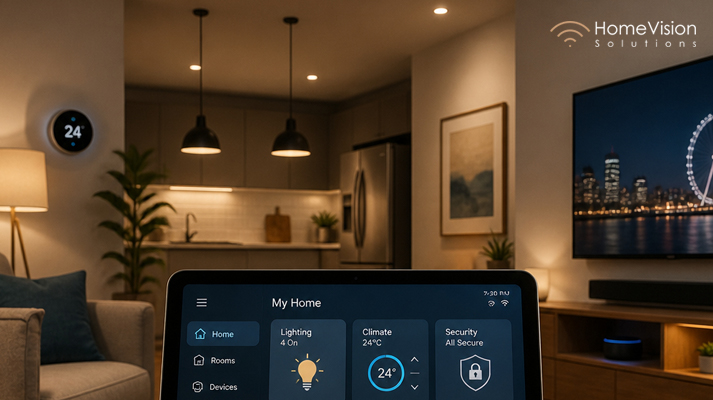
So you’ve started looking into smart home automation. Maybe a friend showed you their Lutron lighting. Maybe you walked past a home theatre showroom and thought, I want that. Or maybe you’re just tired of seven different apps controlling seven different devices and want everything in one place.
Whatever brought you here, you’ve got questions. And we get it, smart home technology can feel overwhelming.
We’re Home Vision Solutions, a professional smart home installation company based in North Vancouver, BC. We’ve been designing and installing lighting, audio, shading, and whole-home automation systems for over 15 years. We serve homeowners across Vancouver, Burnaby, North Vancouver, West Vancouver, and the wider Lower Mainland.
Here are 40 of the most common questions we hear, answered honestly, simply, and without the tech jargon. (For even more insights, check out our complete guide to the 40 smart home questions Vancouver homeowners ask most).
Table of Contents
- Section 1: Smart Lighting & Lutron
- Section 2: Motorized Shades
- Section 3: Whole-Home Audio & Speakers
- Section 4: Home Theatre
- Section 5: Smart Home Systems & Compatibility
- Section 6: Installation, DIY vs. Professional
- Section 7: Reliability, Networking & Future-Proofing
- Bonus: 6 Smart Home Topics Worth Exploring
- Ready to Make Your Home Smarter?
Section 1: Smart Lighting & Lutron
1. Should I Choose Lutron Lighting for My Smart Home?
A: If you want the most reliable, elegant smart lighting system available, Lutron is a great option. It has long been the gold standard in lighting control. It works beautifully on its own and integrates seamlessly with Control4 and other automation platforms. If your budget allows, Lutron is the one we recommend most often for high-end homes in Vancouver.
A: If you want the most reliable, elegant smart lighting system available, Lutron is a great option. It has long been the gold standard in lighting control. It works beautifully on its own and integrates seamlessly with Control4 and other automation platforms. If your budget allows, Lutron is the one we recommend most often for high-end homes in Vancouver.
2. How to Install Smart Light Switches Without Hiring an Electrician
A: Some DIY smart switches (like Lutron Caseta) are designed for homeowner installation and don’t require a neutral wire. That said, electrical work can be dangerous, and larger or more complex systems should always be installed by a licensed professional. If you’re planning a whole-home setup, it’s best to bring in an expert.
A: Some DIY smart switches (like Lutron Caseta) are designed for homeowner installation and don’t require a neutral wire. That said, electrical work can be dangerous, and larger or more complex systems should always be installed by a licensed professional. If you’re planning a whole-home setup, it’s best to bring in an expert.
3. Lutron vs Other Smart Lighting Brands: Which Should I Buy?
A: Lutron stands above most competitors in reliability, dimming quality, and professional integration. Brands like Philips Hue are great for casual use but aren’t built for whole-home professional systems. Control4 native lighting is also an excellent option. However, for premium residential projects, Lutron is consistently rated the top choice among professional installers.
A: Lutron stands above most competitors in reliability, dimming quality, and professional integration. Brands like Philips Hue are great for casual use but aren’t built for whole-home professional systems. Control4 native lighting is also an excellent option. However, for premium residential projects, Lutron is consistently rated the top choice among professional installers.
4. How to Choose Between Lutron Caseta and Professional Lutron Systems
A: Lutron Caseta is the consumer-grade, DIY-friendly line. It’s a great choice if your setup only includes a few rooms. Professional Lutron systems (RadioRA 3, HWQS) are dealer-installed, offer whole-home integration, support thousands of devices, and include premium keypads and scene programming. For serious smart home projects, the professional line is the way to go.
A: Lutron Caseta is the consumer-grade, DIY-friendly line. It’s a great choice if your setup only includes a few rooms. Professional Lutron systems (RadioRA 3, HWQS) are dealer-installed, offer whole-home integration, support thousands of devices, and include premium keypads and scene programming. For serious smart home projects, the professional line is the way to go.
5. How Much Does a Smart Lighting System Really Cost?
A: A basic Lutron Caseta setup for a few rooms can run $500–$1,500 self-installed. A professionally installed whole-home Lutron system typically starts around $5,000–$8,000 and scales up depending on the number of fixtures, keypads, and integration complexity. Contact us for a custom quote based on your home.
A: A basic Lutron Caseta setup for a few rooms can run $500–$1,500 self-installed. A professionally installed whole-home Lutron system typically starts around $5,000–$8,000 and scales up depending on the number of fixtures, keypads, and integration complexity. Contact us for a custom quote based on your home.
6. How to Add Smart Lighting to an Older Home
A: Great news! Most older homes can be upgraded with smart lighting without major renovations or extensive rewiring. Many modern systems use wireless technology, allowing existing switches to be replaced with smart dimmers or keypads with minimal disruption. Every home is different, so a site visit allows our team to recommend the best solution based on your home’s layout and electrical system.
A: Great news! Most older homes can be upgraded with smart lighting without major renovations or extensive rewiring. Many modern systems use wireless technology, allowing existing switches to be replaced with smart dimmers or keypads with minimal disruption. Every home is different, so a site visit allows our team to recommend the best solution based on your home’s layout and electrical system.
7. Can I Add Smart Lighting Without Rewiring My House?
A: Lutron’s wireless systems are specifically designed to work with existing wiring. No neutral wire is required for most switches, which makes Lutron an excellent option for retrofitting older homes.
A: Lutron’s wireless systems are specifically designed to work with existing wiring. No neutral wire is required for most switches, which makes Lutron an excellent option for retrofitting older homes.
8. How Reliable Are Smart Home Lighting Systems?
A: With quality products and professional installation, home lighting systems are extremely reliable. Lutron uses a proprietary Clear Connect RF protocol designed specifically for lighting. It doesn’t share bandwidth with WiFi, so there’s no interference or dropouts.
A: With quality products and professional installation, home lighting systems are extremely reliable. Lutron uses a proprietary Clear Connect RF protocol designed specifically for lighting. It doesn’t share bandwidth with WiFi, so there’s no interference or dropouts.
9. Creating the Perfect Ambiance with Smart Lighting Scenes
A: Smart lighting scenes let you save preset lighting for different moments. “Movie Night” dims the lights, “Good Morning” gradually brightens your home, and “Dinner” creates a warm, inviting atmosphere. Your installer can help program these for you; you can simply tap or use a voice command to activate them.
A: Smart lighting scenes let you save preset lighting for different moments. “Movie Night” dims the lights, “Good Morning” gradually brightens your home, and “Dinner” creates a warm, inviting atmosphere. Your installer can help program these for you; you can simply tap or use a voice command to activate them.
10. What’s Better: Voice Control or App Control for Smart Homes?
A: Both, honestly. Use voice (Alexa, Google Home, Siri) for quick, hands-free commands — turning lights off, adjusting temperature, locking doors. Use the app for more detailed control, scene selection, or remote access when you’re away. In a well-designed system, keypads handle 80% of daily use, the app handles remote access, and voice serves as the convenience layer on top.
A: Both, honestly. Use voice (Alexa, Google Home, Siri) for quick, hands-free commands — turning lights off, adjusting temperature, locking doors. Use the app for more detailed control, scene selection, or remote access when you’re away. In a well-designed system, keypads handle 80% of daily use, the app handles remote access, and voice serves as the convenience layer on top.
Section 2: Motorized Shades
11. Why Choose Motorized Shades Over Manual Blinds?
A: Motorized shades are more convenient, more precise, and can be automated. You can schedule them to open at sunrise, close when the room gets too warm, or sync with your lighting scenes. For high windows or hard-to-reach spots, they’re practically essential. And honestly, once you’ve used motorized shades, manual blinds feel like going backwards.
A: Motorized shades are more convenient, more precise, and can be automated. You can schedule them to open at sunrise, close when the room gets too warm, or sync with your lighting scenes. For high windows or hard-to-reach spots, they’re practically essential. And honestly, once you’ve used motorized shades, manual blinds feel like going backwards.
12. Can Smart Shades Save Money on Energy Bills?
A: Yes. Motorized shades can help reduce heat gain in summer and retain warmth in colder months, making your home more comfortable and potentially lowering heating and cooling costs. (Learn more in our ultimate guide to motorized roller shade systems).
A: Yes. Motorized shades can help reduce heat gain in summer and retain warmth in colder months, making your home more comfortable and potentially lowering heating and cooling costs. (Learn more in our ultimate guide to motorized roller shade systems).
13. Smart Shades for Home Theatre: Do They Make a Difference?
A: Blackout shades that drop automatically when you press Play are a game-changer for daytime viewing. No more glare, no more washed-out picture. They’re one of our most requested additions for home theatre setups, and one of the most satisfying to demo for clients.
A: Blackout shades that drop automatically when you press Play are a game-changer for daytime viewing. No more glare, no more washed-out picture. They’re one of our most requested additions for home theatre setups, and one of the most satisfying to demo for clients.
14. How to Control Lights, Shades, and Audio from One App
A: Seamless control is one of the biggest reasons people invest in a proper home automation system. Platforms like Control4 bring lighting, shading, audio, climate, and security into a single app interface. A professionally designed system brings all these elements together in a single interface that you can control from your phone, a touchscreen, or a keypad.
A: Seamless control is one of the biggest reasons people invest in a proper home automation system. Platforms like Control4 bring lighting, shading, audio, climate, and security into a single app interface. A professionally designed system brings all these elements together in a single interface that you can control from your phone, a touchscreen, or a keypad.
Section 3: Whole-Home Audio & Speakers
15. Best Whole-Home Audio Systems for Houses
A: Sonos is one of the most popular and user-friendly multi-room audio systems on the market. For high-end installations, we pair Sonos with architectural speakers from brands like Sonance, Klipsch, and Origin Acoustics. Control4 also has excellent built-in multi-room audio integration. Whether you’re adding music to one room or every room, the goal is the same: simple control and great sound wherever you want it. (Discover how multi-room audio makes everyday living in North Vancouver better).
A: Sonos is one of the most popular and user-friendly multi-room audio systems on the market. For high-end installations, we pair Sonos with architectural speakers from brands like Sonance, Klipsch, and Origin Acoustics. Control4 also has excellent built-in multi-room audio integration. Whether you’re adding music to one room or every room, the goal is the same: simple control and great sound wherever you want it. (Discover how multi-room audio makes everyday living in North Vancouver better).
16. Can Invisible Speakers Really Work in My Walls?
A: Yes, and they work surprisingly well. In-wall and in-ceiling speakers from quality brands like Sonance or Klipsch deliver excellent sound while disappearing from view. They’re plastered and painted over, leaving them completely invisible. The result is high-quality audio with virtually no visual impact, making it a popular choice for homeowners who want exceptional sound without visible hardware.
A: Yes, and they work surprisingly well. In-wall and in-ceiling speakers from quality brands like Sonance or Klipsch deliver excellent sound while disappearing from view. They’re plastered and painted over, leaving them completely invisible. The result is high-quality audio with virtually no visual impact, making it a popular choice for homeowners who want exceptional sound without visible hardware.
17. Is It Expensive to Have Speakers Hidden in Walls?
A: In-wall speaker installation (including speakers, amplification, wiring, and finishing) can run $800–$2,500 per room, depending on speaker quality and wiring complexity. For a whole home, you’ll want to budget $5,000–$15,000+. However, the result is a completely clean, permanent audio system with no visible hardware, much like the luxurious sound upgrades we install in West Vancouver homes.
A: In-wall speaker installation (including speakers, amplification, wiring, and finishing) can run $800–$2,500 per room, depending on speaker quality and wiring complexity. For a whole home, you’ll want to budget $5,000–$15,000+. However, the result is a completely clean, permanent audio system with no visible hardware, much like the luxurious sound upgrades we install in West Vancouver homes.
18. Indoor Speakers vs. Outdoor Speakers: What Do I Need?
A: Outdoor speakers are weatherproof (rated for rain, humidity, UV exposure) and enclosed to project sound in open spaces. Indoor architectural speakers are optimized for room acoustics and designed to blend into your walls and ceilings. Both can be part of the same multi-room audio system, including setups for your outdoor living spaces. You just need the right speaker for each environment, and we’re here to help you choose.
A: Outdoor speakers are weatherproof (rated for rain, humidity, UV exposure) and enclosed to project sound in open spaces. Indoor architectural speakers are optimized for room acoustics and designed to blend into your walls and ceilings. Both can be part of the same multi-room audio system, including setups for your outdoor living spaces. You just need the right speaker for each environment, and we’re here to help you choose.
19. How to Automate Your Home’s Volume Levels
A: Audio systems can automatically adjust volume based on the room, time of day, or what’s happening in your home. Music can play softly in the morning, lower when the doorbell rings, or turn off automatically at night. Small touches like these make everyday living feel effortless.
A: Audio systems can automatically adjust volume based on the room, time of day, or what’s happening in your home. Music can play softly in the morning, lower when the doorbell rings, or turn off automatically at night. Small touches like these make everyday living feel effortless.
20. Home Automation Must-Haves vs. Nice-to-Haves for Audio
A: Start with quality speakers in the rooms you use most and a simple way to control them. From there, you can always expand with outdoor speakers, additional rooms, or smart home integrations as your needs grow.
A: Start with quality speakers in the rooms you use most and a simple way to control them. From there, you can always expand with outdoor speakers, additional rooms, or smart home integrations as your needs grow.
Section 4: Home Theatre
21. How to Design a Home Theatre Room
A: A great home theatre starts with the room itself. From there, seating, acoustics, lighting, the display, and audio all work together to create an immersive experience. Motorized blackout shades are a great finishing touch for that authentic home-theatre experience.
A: A great home theatre starts with the room itself. From there, seating, acoustics, lighting, the display, and audio all work together to create an immersive experience. Motorized blackout shades are a great finishing touch for that authentic home-theatre experience.
22. Getting Started with Home Theatre and Automation Together
A: Integrate your theatre into your Control4 or whole-home system. When you press “Watch Movie”, everything happens automatically: shades close, lights dim to 10%, the projector turns on, the receiver switches to the right input, and the audio sets to your preferred level. It’s one of the most impressive demos we do for new clients. (See how distributed video is changing the way you watch content).
A: Integrate your theatre into your Control4 or whole-home system. When you press “Watch Movie”, everything happens automatically: shades close, lights dim to 10%, the projector turns on, the receiver switches to the right input, and the audio sets to your preferred level. It’s one of the most impressive demos we do for new clients. (See how distributed video is changing the way you watch content).
Section 5: Smart Home Systems & Compatibility
23. Can I Mix Different Smart Home Brands Together?
A: Yes, but it’s not always straightforward. Platforms like Control4 are designed to integrate with thousands of third-party lighting, audio, climate, security, and shading brands, bringing them together in a unified system. Without a central platform, mixing brands often means juggling multiple apps and limited automation. A professional can help ensure all of your devices work together reliably, both now and as your system grows.
A: Yes, but it’s not always straightforward. Platforms like Control4 are designed to integrate with thousands of third-party lighting, audio, climate, security, and shading brands, bringing them together in a unified system. Without a central platform, mixing brands often means juggling multiple apps and limited automation. A professional can help ensure all of your devices work together reliably, both now and as your system grows.
24. What’s the Best Home Automation System for Beginners?
A: For true beginners who want simplicity, Google Home or Apple HomeKit are accessible starting points. For a whole-home system that grows with you, Control4 is one of our top recommendations. It’s designed to be easy for homeowners to use (even non-technical ones). But don’t be fooled, it can integrate lighting, audio, security, climate, and more into one intuitive system.
A: For true beginners who want simplicity, Google Home or Apple HomeKit are accessible starting points. For a whole-home system that grows with you, Control4 is one of our top recommendations. It’s designed to be easy for homeowners to use (even non-technical ones). But don’t be fooled, it can integrate lighting, audio, security, climate, and more into one intuitive system.
25. Is a Home Automation Hub Worth the Investment?
A: If you have more than a few smart devices, it’s definitely worth investing in a hub. Without one, you end up with multiple apps, incompatible systems, and limited automation. A proper hub (like Control4) ties everything together into a single interface and enables the kind of whole-home automation that makes a smart home feel genuinely smart.
A: If you have more than a few smart devices, it’s definitely worth investing in a hub. Without one, you end up with multiple apps, incompatible systems, and limited automation. A proper hub (like Control4) ties everything together into a single interface and enables the kind of whole-home automation that makes a smart home feel genuinely smart.
26. Smart Home Automation: Where Should I Start?
A: Start with the thing that will impact your daily life the most. For most Vancouver homeowners, that’s lighting. It touches every room and every moment of your day. Add motorized shades next for energy and comfort. Then audio, climate, and security. You don’t need to do everything at once. Better to invest in quality that will last than chasing trends.
A: Start with the thing that will impact your daily life the most. For most Vancouver homeowners, that’s lighting. It touches every room and every moment of your day. Add motorized shades next for energy and comfort. Then audio, climate, and security. You don’t need to do everything at once. Better to invest in quality that will last than chasing trends.
27. How to Build a Seamless Smart Home Ecosystem
A: Choose a central platform (Control4, for example), pick brands that integrate well with it (Lutron for lighting, Sonos for audio), and have everything installed and programmed by one professional integrator. Seamless ecosystems don’t happen by accident— they’re designed. Choosing compatible products and having them professionally configured creates a simpler, more reliable experience than trying to piece together disconnected devices.
A: Choose a central platform (Control4, for example), pick brands that integrate well with it (Lutron for lighting, Sonos for audio), and have everything installed and programmed by one professional integrator. Seamless ecosystems don’t happen by accident— they’re designed. Choosing compatible products and having them professionally configured creates a simpler, more reliable experience than trying to piece together disconnected devices.
28. Best Home Automation for High-End Homes
A: Control4 as the automation backbone, Lutron for lighting and shading, Sonance or Origin Acoustics for in-wall/in-ceiling audio, Luma or ClareVision for security cameras, and robust enterprise-grade networking. This is exactly the kind of high-quality, high-performance system we design and install at Home Vision Solutions for luxury homes in West Vancouver, Shaughnessy, and across the Lower Mainland.
A: Control4 as the automation backbone, Lutron for lighting and shading, Sonance or Origin Acoustics for in-wall/in-ceiling audio, Luma or ClareVision for security cameras, and robust enterprise-grade networking. This is exactly the kind of high-quality, high-performance system we design and install at Home Vision Solutions for luxury homes in West Vancouver, Shaughnessy, and across the Lower Mainland.
29. Best Smart Home Upgrades Before Selling Your House
A: Lighting control and motorized shades often make the biggest visual impact during showings. Smart locks and security cameras add convenience and practical appeal, while a whole-home audio system can help set your property apart. A well-designed, easy-to-use smart home system can leave a lasting impression on potential buyers, especially in Vancouver’s luxury market.
A: Lighting control and motorized shades often make the biggest visual impact during showings. Smart locks and security cameras add convenience and practical appeal, while a whole-home audio system can help set your property apart. A well-designed, easy-to-use smart home system can leave a lasting impression on potential buyers, especially in Vancouver’s luxury market.
30. What Home Automation Do Real Estate Agents Recommend?
A: Real estate professionals often recommend smart lighting, motorized shades, and integrated security as valuable upgrades that appeal to today’s buyers. Buyers generally prefer systems that are intuitive and professionally installed rather than a collection of disconnected smart devices. A well-designed, easy-to-use system can be an attractive feature, particularly in higher-end homes.
A: Real estate professionals often recommend smart lighting, motorized shades, and integrated security as valuable upgrades that appeal to today’s buyers. Buyers generally prefer systems that are intuitive and professionally installed rather than a collection of disconnected smart devices. A well-designed, easy-to-use system can be an attractive feature, particularly in higher-end homes.
Section 6: Installation, DIY vs. Professional
31. Should I Hire a Professional for Smart Home Installation?
A: A single smart plug or one smart bulb is probably a safe candidate for DIY installation. For more complex installations like lighting control, motorized shades, whole-home audio, or a central automation hub, it’s best to hire a professional. Improper installation can lead to reliability issues, and fixing a bad DIY setup often costs more than doing it right the first time.
A: A single smart plug or one smart bulb is probably a safe candidate for DIY installation. For more complex installations like lighting control, motorized shades, whole-home audio, or a central automation hub, it’s best to hire a professional. Improper installation can lead to reliability issues, and fixing a bad DIY setup often costs more than doing it right the first time.
32. Common Smart Home Mistakes to Avoid Before You Buy
A: Choosing the cheapest option without checking compatibility. Buying multiple brands without a central platform to tie them together. Skipping proper network infrastructure (smart homes need solid WiFi and wired networking). Not planning for scalability. And going DIY on systems that really need professional programming. When in doubt, talk to an expert before you buy.
A: Choosing the cheapest option without checking compatibility. Buying multiple brands without a central platform to tie them together. Skipping proper network infrastructure (smart homes need solid WiFi and wired networking). Not planning for scalability. And going DIY on systems that really need professional programming. When in doubt, talk to an expert before you buy.
33. How Professional Smart Home Installers Set Up Your System
A: Every project starts with a consultation to understand your home, your lifestyle, and your goals. Then we design a custom system, source the right equipment, and handle full installation — wiring, mounting, configuration, and programming. We integrate all systems so they work together, walk you through the operation, and provide ongoing support. No loose ends.
A: Every project starts with a consultation to understand your home, your lifestyle, and your goals. Then we design a custom system, source the right equipment, and handle full installation — wiring, mounting, configuration, and programming. We integrate all systems so they work together, walk you through the operation, and provide ongoing support. No loose ends.
34. Best Time to Install Smart Home Technology in New Construction
A: Whenever possible, the best time to invest in smart home technology is during construction before the walls close. Pre-wiring for lighting, audio, shading, and networking during rough-in is dramatically cheaper and cleaner than retrofitting later. If you’re building in Vancouver, get your smart home installer involved at the pre-construction stage. We regularly work directly with builders and architects.
A: Whenever possible, the best time to invest in smart home technology is during construction before the walls close. Pre-wiring for lighting, audio, shading, and networking during rough-in is dramatically cheaper and cleaner than retrofitting later. If you’re building in Vancouver, get your smart home installer involved at the pre-construction stage. We regularly work directly with builders and architects.
Section 7: Reliability, Networking & Future-Proofing
35. Why Your Smart Home Needs Proper Networking
A: Everything in a modern smart home, from your cameras, audio, lighting, climate, and locks, runs over your network. A consumer-grade router simply can’t handle the load reliably. We design and install enterprise-grade networking (Cisco Meraki, Pakedge, or similar) with proper access points and VLANs for all your smart home devices.
A: Everything in a modern smart home, from your cameras, audio, lighting, climate, and locks, runs over your network. A consumer-grade router simply can’t handle the load reliably. We design and install enterprise-grade networking (Cisco Meraki, Pakedge, or similar) with proper access points and VLANs for all your smart home devices.
36. What Happens When Your Smart Home Internet Goes Down?
A: Many professionally installed smart home systems will continue to operate locally even without an internet connection, so features like lighting, keypads, audio, and other core functions can keep working. However, remote access, voice assistants, and other cloud-based features may be temporarily unavailable until your internet service is restored.
A: Many professionally installed smart home systems will continue to operate locally even without an internet connection, so features like lighting, keypads, audio, and other core functions can keep working. However, remote access, voice assistants, and other cloud-based features may be temporarily unavailable until your internet service is restored.
37. How to Future-Proof Your Smart Home Setup
A: The best way to future-proof your smart home is to start with a reliable platform that can grow with your needs. Choosing quality products, like Control4, planning for future upgrades, and installing the right wiring where possible, give you more flexibility down the road. Working with an experienced installer also helps ensure your system stays up to date as technology evolves.
A: The best way to future-proof your smart home is to start with a reliable platform that can grow with your needs. Choosing quality products, like Control4, planning for future upgrades, and installing the right wiring where possible, give you more flexibility down the road. Working with an experienced installer also helps ensure your system stays up to date as technology evolves.
38. Should I Invest in a Smart Home Automation Ecosystem?
A: For many homeowners, the convenience of controlling lighting, climate, audio, security, and more from a single system makes smart home automation a worthwhile investment. The key is choosing quality products and having the system thoughtfully designed and professionally installed. A well-planned smart home is reliable, easy to use, and can continue to evolve with your needs over time.
A: For many homeowners, the convenience of controlling lighting, climate, audio, security, and more from a single system makes smart home automation a worthwhile investment. The key is choosing quality products and having the system thoughtfully designed and professionally installed. A well-planned smart home is reliable, easy to use, and can continue to evolve with your needs over time.
39. Hidden Smart Home Features Most People Don’t Know About
A: Occupancy-based lighting that turns off automatically when you leave a room. Motorized shades that react to your home’s internal temperature sensor. Audio that fades when you get a phone call. Lights that flash when the dryer finishes. A “Good Night” scene that locks every door, arms the alarm, turns off all lights, and lowers the thermostat, all with a single tap. These aren’t gimmicks; they’re the features our clients love most.
A: Occupancy-based lighting that turns off automatically when you leave a room. Motorized shades that react to your home’s internal temperature sensor. Audio that fades when you get a phone call. Lights that flash when the dryer finishes. A “Good Night” scene that locks every door, arms the alarm, turns off all lights, and lowers the thermostat, all with a single tap. These aren’t gimmicks; they’re the features our clients love most.
40. Smart Home Security: How Much Should I Automate?
A: Focus on the automations that make your home safer and easier to manage; you can always add on to the system later. Locking doors automatically, turning on lights when motion is detected, and receiving alerts when a door or window opens unexpectedly are all practical features that many homeowners find valuable. A professionally integrated home security system brings these devices together so they work seamlessly, giving you greater peace of mind without adding complexity. (Read more about why smarter security solutions for Vancouver homes need more than just alarms).
A: Focus on the automations that make your home safer and easier to manage; you can always add on to the system later. Locking doors automatically, turning on lights when motion is detected, and receiving alerts when a door or window opens unexpectedly are all practical features that many homeowners find valuable. A professionally integrated home security system brings these devices together so they work seamlessly, giving you greater peace of mind without adding complexity. (Read more about why smarter security solutions for Vancouver homes need more than just alarms).
Bonus: 6 Smart Home Topics Worth Exploring
Lutron Dimming Curves and Colour Temperature Control
Lutron’s proprietary dimming technology produces smooth, flicker-free dimming that most other systems can’t match. Higher-end systems also allow you to adjust colour temperature from warm (2700K for evening ambiance) to cool (5000K for task lighting).
Lutron’s proprietary dimming technology produces smooth, flicker-free dimming that most other systems can’t match. Higher-end systems also allow you to adjust colour temperature from warm (2700K for evening ambiance) to cool (5000K for task lighting).
Voice Assistant Compatibility with Lutron and Control4
Both Lutron and Control4 work with Alexa, Google Home, and Apple Siri. Control4 also has a native voice feature called 4Voice. For hands-free control of lighting, shading, temperature, and entertainment, your system is ready to respond to your voice from the moment it’s installed. (Learn why more people are embracing voice command services in Vancouver).
Both Lutron and Control4 work with Alexa, Google Home, and Apple Siri. Control4 also has a native voice feature called 4Voice. For hands-free control of lighting, shading, temperature, and entertainment, your system is ready to respond to your voice from the moment it’s installed. (Learn why more people are embracing voice command services in Vancouver).
Lighting Automation for Daily Routines
Wake-up scenes that gradually brighten your bedroom. Kitchen lights that come on at 6am on weekdays. Outdoor lights that activate at sunset. Nightlights that activate along the hallway at 2am without waking anyone up. These routines reduce manual interaction and make your home feel effortlessly in sync with your day.
Wake-up scenes that gradually brighten your bedroom. Kitchen lights that come on at 6am on weekdays. Outdoor lights that activate at sunset. Nightlights that activate along the hallway at 2am without waking anyone up. These routines reduce manual interaction and make your home feel effortlessly in sync with your day.
Theatre Room Acoustic Design with Smart Speakers
Great home theatre sound is as much about the room as it is about the speakers. Acoustic panels, proper speaker placement, and in-wall speakers from quality brands are all part of a well-designed theatre room. We design and install theatre rooms that are both visually clean and acoustically impressive.
Great home theatre sound is as much about the room as it is about the speakers. Acoustic panels, proper speaker placement, and in-wall speakers from quality brands are all part of a well-designed theatre room. We design and install theatre rooms that are both visually clean and acoustically impressive.
Smart Home Installation Timeline Expectations
A small lighting and audio project can be completed in 1–2 days. A medium whole-home system (lighting, shading, audio, security, automation) typically takes 3–5 days. Larger installations may span 1–3 weeks. New construction projects are planned over months and installed in phases. We’ll give you a clear timeline during your consultation.
A small lighting and audio project can be completed in 1–2 days. A medium whole-home system (lighting, shading, audio, security, automation) typically takes 3–5 days. Larger installations may span 1–3 weeks. New construction projects are planned over months and installed in phases. We’ll give you a clear timeline during your consultation.
Warranty and Long-Term Support Considerations
Quality smart home equipment (Lutron, Control4, Sonos) carries manufacturer warranties of 1–5 years. At Home Vision Solutions, we provide a workmanship warranty on our installations and offer ongoing support and service contracts.
Quality smart home equipment (Lutron, Control4, Sonos) carries manufacturer warranties of 1–5 years. At Home Vision Solutions, we provide a workmanship warranty on our installations and offer ongoing support and service contracts.
Ready to Make Your Home Smarter?
We’ve covered 40 questions about smart lighting, motorized shades, whole-home audio, home theatres, automation, networking, and security. If there’s one takeaway, it’s this: a great smart home isn’t about having the most gadgets. It’s about choosing the right technology and making sure it all works together seamlessly.
Whether you’re upgrading a few rooms, building a new home, or planning a complete smart home system, thoughtful planning makes all the difference. The right design creates a home that’s more comfortable, secure, and enjoyable to live in every day.
At Home Vision Solutions, we design custom smart home systems tailored to your home, your lifestyle, and your goals. If you’re ready to explore what’s possible, we’d be happy to answer your questions and recommend a solution that’s right for you.
Call us: (604) 716-4201
Email: info@homevisionsolutions.ca
Address: 998 Harbourside Dr #207, North Vancouver, BC V7P 3T2
Website: homevisionsolutions.ca
Email: info@homevisionsolutions.ca
Address: 998 Harbourside Dr #207, North Vancouver, BC V7P 3T2
Website: homevisionsolutions.ca
Request a Free Quote
Recent Posts
- How to Choose the Best Smart Doorbell for Your Front Door
- How to Control Your Entire Smart Home from One Unified App
- Smart Home Automation in Vancouver: Your Complete Guide
- Smart Home Security in Vancouver: Cameras, Alarms, and Everything in Between
- Home Theatre & Whole-Home Audio in Vancouver: The Complete Guide
Categories
- Advanced Alarm Systems
- Advanced CCTV Systems
- Audio Distribution West Vancouver
- Distributed Video Solutions Vancouver
- FIFA World Cup 2026 Canada
- Home Security Camera Systems
- Home Theater Installation Vancouver
- Motorized & Roller Shade Systems
- Multi-Room Audio Design Vancouver
- People also search for
- Security Solutions Vancouver
- Smart Doorbell
- Smart Home
- Smart Home Automation
- Smart Home Security Systems Vancouver
- Smart Lighting Solutions Vancouver
- Video Doorbell Systems Vancouver
- Voice Command Service Vancouver
- Wireless Lighting Vancouver
RELATED POST
April 27, 2026
Smart Lighting Solutions Vancouver: 40 Real Questions Answered
Smart lighting is one of those upgrades that sounds complicated until someone explains it properly. How much does it cost?...
April 7, 2026
Home Security Vancouver: 40 Real Questions Answered Simply
Home security is one of those topics where everyone has questions, but not many people get straight answers. How much...
April 7, 2026
40 Smart Home Questions Vancouver Homeowners Ask Most — Answered
If you've been thinking about automating your Vancouver home but aren't sure where to start, you're not alone. We hear...